waveme
  • Introduction
  • User Manual
    • Getting Started
    • General Options
    • Ruler
    • Title
    • Rows >
      • Waveform Options
      • Signal Waveform >
        • Digital Segments
        • Analog Segments
      • Auto Signal Waveform
      • Bus Waveform
      • Auto Bus Waveform
      • Signal & Bus Segments
      • Spacer Row
      • Time Axis
      • Arrows >
        • Across Arrow
        • Along Arrow
      • Labels
      • Value-lines
    • Gaps
    • Grid Lines
    • Zoom
    • Undo/Redo
    • Convert to Black-and-White
    • Save (Export) Image
    • Diagram Defaults
    • Keyboard Shortcuts
  • Download
  • Contact
  • About
  • License
  • Log

Title

A Title is a single line of text shown at the very top of a diagram.

Menu:     Diagram | Title
Shortcut: t

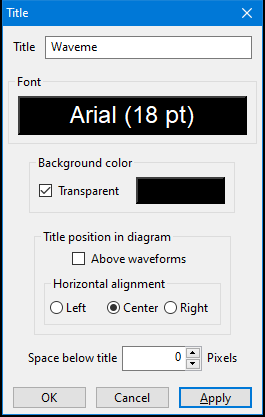
You can configure title:
  • Title Font and color.
  • Title Background color can be selected, when Transparent is unchecked.
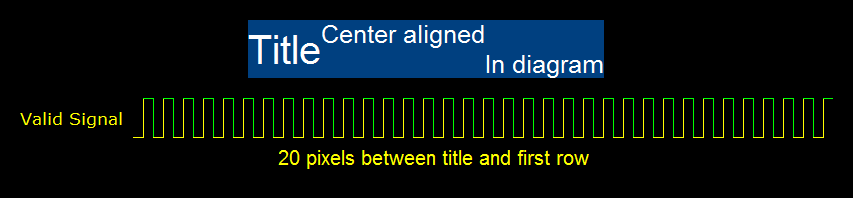
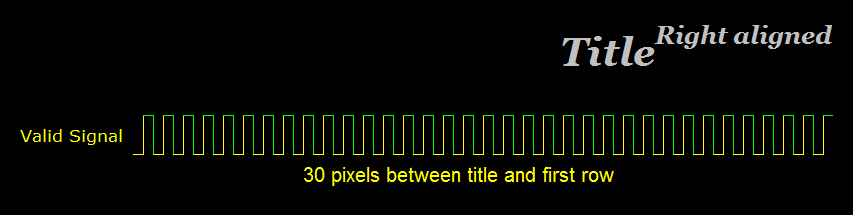
  • Title can be aligned within the drawing area, with Title position in diagram. Left, center and right alignment are relative to either: the whole drawing area's width, or when Above waveforms is selected, only to the waveform area's width (i.e. excluding the waveform name region).
  • Extra space can be inserted between the title and the item below it (either a row or a ruler), with Space below title.

Superscript/Subscript
Title text can include superscript and subscript portions, e.g.:
Title with
""Superscript"" and ..Subscript..

Superscript text is surrounded by a pair of quotation marks, and subscript text is surrounded by a pair of dots.
Picture
Title entry and options dialog

Picture
Picture
Picture
Picture
Picture
Powered by Create your own unique website with customizable templates.
  • Introduction
  • User Manual
    • Getting Started
    • General Options
    • Ruler
    • Title
    • Rows >
      • Waveform Options
      • Signal Waveform >
        • Digital Segments
        • Analog Segments
      • Auto Signal Waveform
      • Bus Waveform
      • Auto Bus Waveform
      • Signal & Bus Segments
      • Spacer Row
      • Time Axis
      • Arrows >
        • Across Arrow
        • Along Arrow
      • Labels
      • Value-lines
    • Gaps
    • Grid Lines
    • Zoom
    • Undo/Redo
    • Convert to Black-and-White
    • Save (Export) Image
    • Diagram Defaults
    • Keyboard Shortcuts
  • Download
  • Contact
  • About
  • License
  • Log